
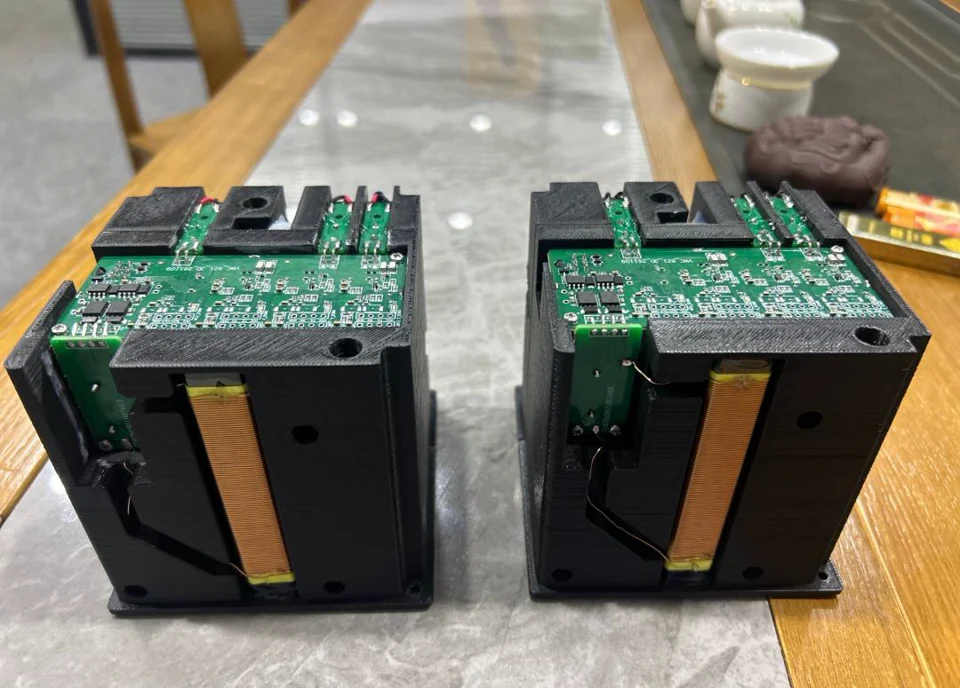
Versions
Start with the outcome your equipment needs and select a configuration to evaluate.
Vector Data
Engineering evaluation · three-axis communication
Evaluate a data link using three orthogonal coil axes. Define the expected device orientations, message schedule and installation conditions.
Prepare evaluation briefVector Locate
Engineering evaluation · 3D positioning
Estimate a compatible terminal’s three-dimensional position. Confirm the anchor layout, reference coordinates and evaluation hardware with engineering.
Prepare evaluation briefExplore the flat-format Link platform →
Review the outdoor equipment setup and its evidence limits →
Planning a course experiment? Explore the university lab exercises.
Plan a Vector evaluation
- Communication
- Specify the message, node orientation, environment, physical route and successful delivery criteria.
- Positioning
- Define the reference coordinate system, available anchor locations, acceptable error and update interval.
- Configuration
- Confirm the assembly, firmware, interfaces, test equipment and sample availability with engineering.
Agree a reference measurement and compare results for the actual device deployment. Record the test setup, trial conditions and observations so another team can interpret the results.
See the evidence and evaluation notes for examples of what to document. For a flat-format sensor-data module, see MagDatix Link.
Configuration questions
When should I evaluate MagDatix Vector Data?
Evaluate Vector Data when two terminals need to exchange data and equipment orientation can change. Its three-axis coil layout is intended for that evaluation.
Keep the message, spacing and power conditions fixed while testing the expected orientations. Record valid messages and interruptions for each orientation, then confirm which configurations and conditions meet the application requirement.
Prepare a Vector Data evaluation brief
What does a MagDatix Vector Locate evaluation require?
Use Vector Locate to evaluate three-dimensional position estimation for a compatible terminal. Define the working volume, reference coordinates and anchor locations with engineering.
Use independently measured reference points at different heights and positions. Compare the estimates with those references under the intended orientations, then report position error and update interval for that setup.
Discuss a Vector evaluation.
Share the installation geometry, device orientations and the data or position your system needs. For positioning, include an accuracy target and update interval.
Email hello@magdatix.com